
If you’ve started looking for agency client management software, you’ve probably already run into a problem: many of the tools you’ll find weren’t designed around the way a small creative agency actually works.

Some are built primarily for sales teams. Others are designed for large organizations with complex operations. The feature lists can be long, the setup complicated, and the software itself may solve problems your studio doesn’t have.
A small creative agency has a different challenge.
You need to keep client work organized, know what’s happening across active projects, track the time your team spends on that work, stay on top of budgets and retainers, and have reliable information when it’s time to bill.
So what should you actually look for?
For most small creative studios, the best agency client management software connects clients, projects, time, budgets, and reporting in one place without creating more administrative work for the team.
Here’s how to evaluate your options.
What Is Agency Client Management Software?
Agency client management software helps agencies organize client relationships and the work connected to them.
Unlike a traditional CRM, which is primarily designed to manage prospects and sales activity, agency client management software needs to support what happens after a client becomes a client.
For a creative agency, that typically means being able to:
- Keep client and project information organized
- See active projects, deadlines, and responsibilities
- Track billable and non-billable time
- Monitor project budgets and estimates
- Manage ongoing retainer work
- Report on work completed and time spent
- Give agency leaders visibility into client and project performance
Larger agencies may use separate systems for CRM, project management, time tracking, resource planning, and finance.
For a small studio, maintaining that kind of software stack can quickly become another job.
The goal isn’t to have the most tools. It’s to have enough visibility to answer basic questions about your client work without chasing information across five different places.

Agency Client Management Software vs. CRM: What’s the Difference?
A CRM and agency client management software solve related but different problems.
A CRM is primarily designed to manage relationships before and during a sale. It helps teams track prospects, contacts, conversations, opportunities, and sales pipelines.
Agency client management software is primarily designed to manage the work delivered to clients. It connects client relationships with projects, time, budgets, retainers, and reporting.
That distinction matters for creative agencies.
Your active clients aren’t simply contacts moving through a funnel. They may have multiple projects underway, different budgets, recurring work, deadlines, estimates, and dozens of hours being logged against their accounts.
Knowing when you last emailed a client is useful.
Knowing that the client has three active projects, one approaching its budget and another due Friday, is a different kind of visibility.
That’s why small agencies evaluating client management software should look beyond traditional CRM features and consider how well each tool manages the actual work behind the client relationship.
6 Features to Look for in Agency Client Management Software
Not every feature on a software comparison page matters equally to a small creative studio.
Start with the capabilities your team will actually use.
1. Client and Project Organization
You need one place where you can understand what’s happening with a client.
That means more than storing a name, email address, and phone number. You should also be able to see the projects associated with that client and quickly understand the status of their work.
Ask yourself: if someone asks “where are we with this client?” how long does it take us to answer?
Good agency client tracking software should make that answer easy to find.
2. Project Tracking
Client management and project management are closely connected in an agency.
Every active relationship creates work: campaigns, websites, design requests, content, deliverables, revisions, meetings, and ongoing support.
Your software should make it easy to see:
- Which projects are active
- Who is responsible for them
- What’s due
- How much time has been spent
- How actual work compares with the estimate or budget
This is one of the biggest differences between project-centric agency software and a traditional CRM.
A contact record tells you who the client is. A connected project record tells you what’s actually happening with their work.
3. Time Tracking Connected to Clients and Projects
For agencies, time data isn’t just for timesheets. It helps explain what client work actually costs to deliver.
If time is tracked separately from projects, teams often end up reconstructing that connection later.
Instead, look for software that lets people record time directly against the relevant client, project, and task.
That creates a much cleaner trail between client, project, work, time, and budget.
It also gives agency leaders better information for estimating future projects, reviewing client accounts, and identifying work that is taking longer than expected.
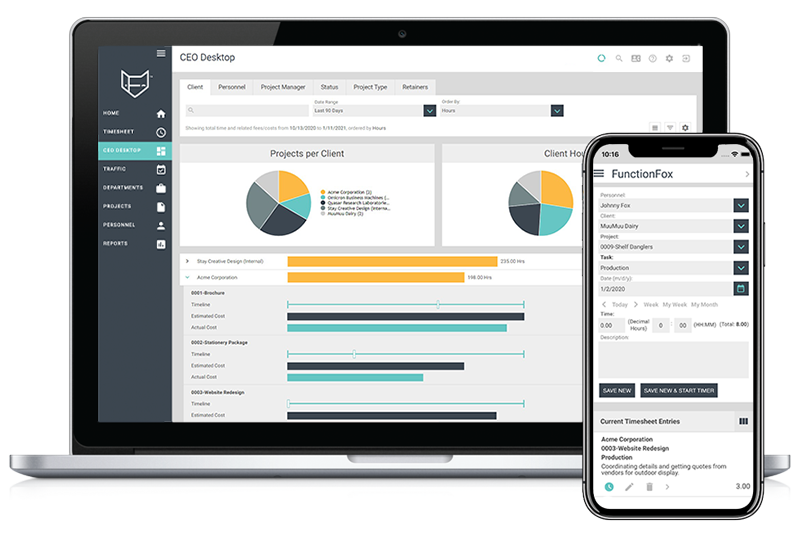
FunctionFox, for example, lets users enter time manually or with a stopwatch and ties each entry to a client, project, and task.
4. Budget and Estimate Tracking
Knowing how many hours you’ve worked isn’t enough. You also need context for those hours.
If a project was estimated at 40 hours, reaching 32 hours means something very different when the project is almost finished than when it’s only halfway through.
Look for agency software that lets you compare estimates with actual time and costs as work progresses.
This gives your team an opportunity to spot problems while there’s still time to do something about them, instead of discovering an overrun after the project ends.
5. Retainer Management
Retainer clients need to be managed differently from one-off projects.
If a client has purchased a certain number of hours or a set monthly fee, your team needs to know how much of that retainer has been used as the month progresses.
Without that visibility, it’s easy to over-service an account or reach the limit before anyone realizes it.
Useful retainer management software should let you:
- Set a monthly hours or fee budget
- Connect relevant client projects to the retainer
- Track actual usage against that amount
- Monitor how much of the retainer has been consumed
- Review retainer performance over time
This is especially important for agencies with recurring client relationships.
6. Reporting
The purpose of tracking all this information isn’t to create more data. It’s to answer better questions.
Can you tell which projects are using more time than estimated? Which clients account for the most hours? Where is non-billable time going? Are you approaching the limit on a retainer?
Good agency reporting should make the information your team is already recording useful for day-to-day decisions.
What to Avoid When Choosing Small Agency Software
A long feature list doesn’t necessarily make a tool better for your studio.
In fact, some of the most important things to evaluate are the problems a new system could create.
Software that’s more complex than your agency needs
Enterprise features can look impressive during a demo and become frustrating once your team has to use them every day.
Ask how much configuration is required before the software becomes useful.
If your 6-person studio needs weeks of implementation to manage everyday client work, you may be buying more system than you need.
Disconnected project and time tracking
If projects live in one system and time lives in another, someone eventually has to connect the two.
That might work technically, but it adds another opportunity for missing information, inconsistent data, and administrative work.
For time-based creative businesses, the closer your time tracking is to the work itself, the better.
CRM-first software when delivery is your real problem
If your biggest challenge is generating and nurturing leads, a CRM may be exactly what you need.
But if the problem begins after the contract is signed, when you need to keep projects organized, track hours, monitor budgets, and manage retainers, adding more sales functionality won’t solve it.
Choose software around the problem you’re actually trying to fix.
No clear way to manage retainers
If recurring work represents a meaningful part of your revenue, test retainer functionality before committing to a tool.
Don’t assume that a generic project budget can easily substitute for a monthly retainer workflow.
Pricing that doesn’t fit your team structure
Don’t compare software based only on the advertised per-user price.
Check minimum user requirements, which features are included in each plan, and whether freelancers or contractors will need paid access.
The cheapest-looking option isn’t always the least expensive once your actual team is configured.
How to Evaluate Agency Client Management Software
Before comparing products, map the way your studio currently works.
You don’t need a complicated requirements document. Start with these questions.
How many clients and projects are active at the same time?
Eight clients with 15 active projects creates a different operational challenge from 40 clients with hundreds of ongoing jobs.
Your software should make your normal workload easy to understand at a glance.
How do you bill clients?
Do you primarily work with:
- Hourly billing?
- Fixed-fee projects?
- Monthly retainers?
- A combination of all three?
Make sure the software supports the way you actually charge for work rather than forcing your agency into one billing model.
How does your team track time today?
If incomplete or inaccurate timesheets are already a problem, don’t underestimate usability.
A sophisticated reporting system won’t help if the underlying time data never gets entered.
How do you track project budgets?
Find out whether your team can see estimates versus actuals while a project is underway.
Budget information is far more useful before the project goes over than after.
What information do you need for client conversations?
Think about the questions clients actually ask. How much of our retainer have we used? Where did the hours go? Are we still within the project estimate? What has the team been working on?
Your client management system should make those answers easier to provide.
Will your team actually use it?
This may be the most important question.
Software only creates visibility when people consistently use it.
A simpler system that becomes part of your team’s daily routine can be more valuable than a feature-rich platform everyone avoids.

A Simple Agency Software Comparison Checklist
When evaluating agency client management software, use this checklist.
| Question | Why it matters |
|---|---|
| Can we see a client’s active projects in one place? | Connects the relationship to the work |
| Is time recorded against clients and projects? | Creates reliable data for budgets and reporting |
| Can we compare estimates with actuals? | Helps identify overruns earlier |
| Can we manage retainers by hours or fees? | Makes recurring client work easier to control |
| Can we report on client and project performance? | Turns operational data into useful decisions |
| Does it support the way we bill? | Prevents workarounds and duplicate systems |
| Is it simple enough for the team to use consistently? | Determines whether the system will contain reliable data |
Don’t choose the tool with the most checkmarks on a 100-feature comparison chart.
Choose the one that solves the problems your studio encounters every week.
Where FunctionFox Fits
FunctionFox is creative agency management software designed specifically around the operational needs of creative teams.
Rather than starting with a sales CRM and adding project functionality around it, FunctionFox connects time tracking, projects, budgets, retainers, and reporting in one system.
Depending on your plan, FunctionFox includes capabilities such as:
- Unlimited clients and active projects
- Stopwatch and manual time tracking
- Project estimates and budget tracking
- Retainer management
- Fixed-fee and hourly project estimates
- Reporting
- Project schedules and Gantt charts
- Availability and resource forecasting
- Customizable reporting
That makes it particularly relevant for creative agencies that need to understand not only who their clients are, but what work they’re doing for them, how much time it’s taking, and how that compares with what they planned.
FunctionFox also supports hourly, fixed-fee, and retainer-based work, so studios don’t have to manage every client using the same billing model.
Frequently Asked Questions About Agency Client Management Software
What is agency client management software?
Agency client management software helps agencies organize client information and manage the work associated with each relationship. Depending on the platform, that can include projects, deadlines, time tracking, budgets, estimates, retainers, billing information, and reporting.
What is the difference between agency client management software and a CRM?
A CRM primarily manages prospects, contacts, sales activity, and pipelines. Agency client management software focuses more heavily on delivering client work, including projects, time, budgets, retainers, and reporting. Agencies may use both, but they solve different parts of the client lifecycle.
What software do small creative agencies need?
Most small creative agencies need a reliable way to manage projects, track time, monitor budgets, organize client work, and report on performance. Agencies with recurring engagements may also need dedicated retainer tracking. Whether those capabilities come from one platform or several tools depends on the agency’s size and workflow.
Do small agencies need a CRM?
Not necessarily. If your agency has a complex sales pipeline or high volume of leads, a CRM can be useful. If your biggest operational challenges involve managing work after clients sign, meaning projects, hours, budgets, and retainers, project-centric agency management software may be a more useful starting point.
Can agency client management software track retainers?
Some platforms can, but retainer functionality varies considerably. Look for software that can assign a monthly hours or fee budget to a client, track work against it, and show how much of the retainer has been used. FunctionFox supports retainers based on either hours or fees.
How should a small agency track billable time?
Ideally, team members should record time against the specific client, project, and task they’re working on. Connecting time entries directly to the work reduces the need to reconstruct timesheets later and creates better data for budget tracking, reporting, estimating, and client conversations.
What should I look for in client management software for a creative agency?
Prioritize software that fits the way your agency delivers work. For most small creative studios, that means client and project organization, easy time tracking, estimate-versus-actual budget tracking, retainer management, useful reporting, and a system simple enough for the team to use consistently.
Choose Software Around the Work, Not the Feature List
The best agency client management software isn’t necessarily the platform with the most features.
It’s the one that gives your team a reliable answer when someone asks: what’s happening with this client?
You should be able to see the work underway, the time being spent, how that compares with the plan, and whether anything needs your attention.
If getting those answers still requires checking three platforms, asking two people, and opening a spreadsheet, your client management system isn’t doing enough of the work for you.
FunctionFox brings client projects, time tracking, budgets, retainers, and reporting together so small creative teams can spend less time reconstructing what happened and more time acting on what they know.
See how FunctionFox helps creative agencies manage client work →