Case Study

How Small Agencies Can Increase Profitability Without Adding Clients

| |

The instinct when a small agency isn’t profitable enough is to find more clients. More projects. More revenue. More growth.

But for most small creative studios, the profitability problem isn’t a revenue problem. It’s an efficiency problem. You’re already generating enough revenue. The issue is how much of it you’re keeping.

This post is about the four levers that actually determine agency profitability at small studios, and how to improve each without adding a single new client.

Why More Clients Isn’t the Answer (Yet)

Adding clients adds revenue. It also adds overhead: more project management, more communication overhead, more context-switching for your team, and more complexity in your operations. If your studio is already under-profiting on its current work, scaling up typically amplifies the problem, not solves it.

Before you invest in growth, it’s worth knowing whether your current client base is actually profitable, and if not, why. The answer is almost always one of four things: utilization, rates, write-offs, or scope management.

How Small Agencies Can Increase Profitability Without Adding Clients

Lever 1: Billable Utilization

Utilization is the percentage of your team’s time that gets billed to clients. If your team works 40 hours a week and bills 28 of them, your utilization rate is 70%.

Most small creative studios don’t know their utilization rate. They don’t track it. Which means they don’t know how much time is being lost to non-billable work, and can’t do anything about it.

What’s a healthy utilization rate for a small studio?

For a small creative studio, 65–75% is typically healthy. Below 60% suggests significant unbillable overhead or underuse of your team’s capacity. Above 80% is possible but often unsustainable. It leaves no room for business development, professional development, or unforeseen demands.

How to improve utilization

First, measure it. You can’t improve what you don’t track. Time tracking by team member, broken into billable vs. non-billable, is the foundation.

Then look at where non-billable time goes. Admin? Pitching new business? Internal meetings? Fixing projects that went sideways? Each category has a different fix.

Excessive admin usually means your systems are too manual. If your team spends hours each week on timesheets, status updates, and report preparation, that’s process overhead that project management software can reduce significantly.

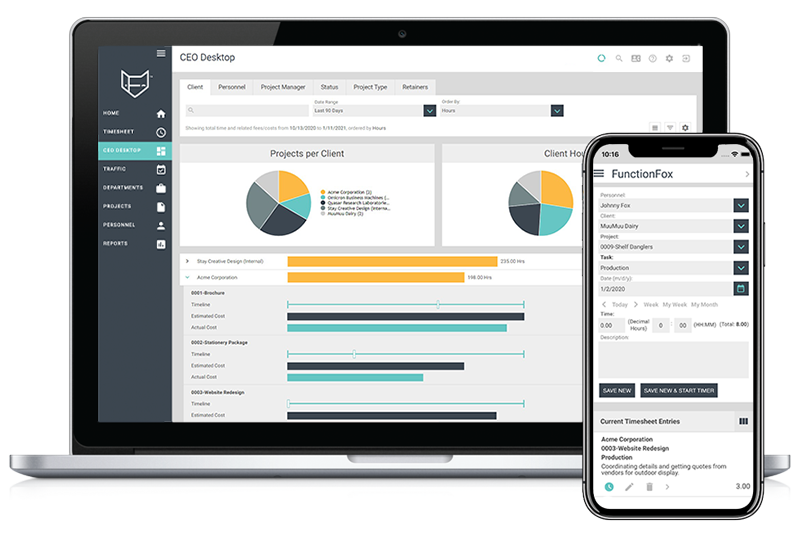
FunctionFox tracks billable and non-billable time separately by team member. You can see utilization across your whole studio at a glance, not as a formula you calculate in a spreadsheet, but as a live data point.

Lever 2: Rate Discipline

Rates are the most straightforward profitability lever, and the most neglected. Small studios consistently undercharge, not because they don’t know their value, but because raising rates feels uncomfortable.

A few rate realities worth confronting:

If clients almost never push back on your pricing, your rates are probably too low. Occasional price pushback is a sign you’re pricing at market. Zero pushback is a sign you’re leaving money on the table.

Rates that haven’t changed in three years have effectively gone down. Costs go up. Inflation is real. A rate that was comfortable in 2022 buys less margin in 2026 than it did then.

You don’t have to raise all your rates at once. Raise rates on new clients first. Apply the new rates when existing clients renew retainers or start new scopes. Annual rate increases of 5–10% are easy to frame and easy for established clients to absorb.

Specialization unlocks premium rates. Generalist studios compete on price. Studios that specialize in a category (healthcare, luxury, B2B SaaS, nonprofit) can often charge meaningfully more because clients value the domain expertise.

Using Time Data to Improve Client Retainers

Lever 3: Write-Off Elimination

A write-off happens when your team works hours that never get billed. This happens constantly in small studios, usually without anyone tracking it:

  • Going an extra round on a design because it didn’t feel right
  • A call that ran 90 minutes when it was scheduled for 30
  • A revision that was “small” but took four hours
  • Fixing a mistake that wasn’t flagged as a scope change

Individually, these feel minor. Cumulatively, they can represent 15–25% of your team’s billable capacity: gone, uncharged, invisible.

How to identify your write-offs

Compare estimated hours to logged hours on completed projects. If actual hours consistently exceed estimates, you’re either estimating poorly (an estimation problem) or absorbing scope expansion without billing for it (a scope management problem).

FunctionFox makes this comparison automatic. Every project’s estimate lives next to its actual logged hours. You can see, at a glance, which project types go over estimate and by how much.

How to reduce write-offs

For scope creep: establish a clear process for flagging when work is expanding beyond the original brief. This doesn’t have to be adversarial. It’s as simple as “we’ve reached the estimated hours for this phase; here’s what it would take to continue.”

For estimation errors: use your historical data. If logo projects consistently take 30% longer than estimated, build that into future estimates. Accurate estimates protect your margins and set better client expectations.

What to bill vs. absorb

Not all over-scope hours should be billed. Some are genuinely your mistake, or important to absorb for relationship reasons. But you should be making that decision explicitly, not accidentally. The default should be to document and discuss, not to silently absorb.

Lever 4: Client Profitability Analysis

Not all clients are equally profitable. Some clients are high-maintenance, slow to approve, prone to scope expansion, and consistently under-budgeted. Others are organized, fast, respectful of your process, and happy to pay for additional work.

Most small studios don’t know which clients are which, at least not in data terms. They have feelings about it, but not numbers.

What to measure per client

  • Total hours logged vs. hours billed (write-off rate per client)
  • Revenue per hour of team time consumed (effective hourly rate)
  • Revision rounds per project
  • Time spent on non-billable client communication

This analysis often produces surprises. A client that feels like a lot of work might be your most profitable because they’re decisive. A “good” client who gives you lots of work might actually have a terrible write-off rate because of endless revisions.

What to do with the analysis

Grow your highest-margin client relationships. Reprice or exit your lowest-margin ones. Structure agreements differently with high-revision clients. This is how you increase profitability from your existing book: not by adding more of everything, but by doing more of what works.

The Compounding Effect

How to Choose Agency Client Management Software for a Small Creative Studio

These four levers interact. A studio that improves utilization from 63% to 72%, raises rates by 10%, cuts write-offs in half, and redirects time from low-margin to high-margin clients can increase profitability dramatically, without adding a single new client.

The math

  • 9 points of utilization improvement on a 5-person team at $125/hour ≈ $36,000/year in additional billed time
  • 10% rate increase across the studio: significant depending on revenue base
  • Write-off reduction from 20% to 10% of hours: equivalent to gaining back half a person’s capacity

None of this requires growth. It requires measurement, discipline, and the right systems.

The Systems That Make This Possible

You can’t manage what you don’t measure. The profitability levers above all require one thing: accurate time data, connected to the projects and clients it belongs to.

That means:

  • Time tracking that happens in real time, not from memory at the end of the week
  • Project-level estimates that exist for comparison
  • Client-level reporting that shows true hours vs. billed hours
  • A clear picture of billable vs. non-billable time by person

This is exactly what FunctionFox is built to provide. It’s not a reporting tool that you feed data into. It’s the system your team works in every day, so the data is already there when you need it.

Start measuring your studio’s profitability with FunctionFox →

Frequently Asked Questions About Increasing Agency Profitability

What is a good profit margin for a small creative agency?

Most healthy small creative agencies target 15–25% net profit margin. Below 10% suggests the studio is not capturing enough value for its work, has excessive overhead, or has significant write-off problems.

What is billable utilization and why does it matter?

Billable utilization is the percentage of your team’s available time that gets billed to clients. A studio with 70% utilization is billing for 70% of its team’s hours. It matters because it directly determines how much of your capacity is generating revenue.

How do I reduce write-offs at my agency?

The most effective approach is accurate time tracking against project estimates. When you can see in real time that you’re approaching or exceeding your estimated hours, you can have the scope conversation before the work is done. After-the-fact write-offs are much harder to address.

Should small agencies specialize to improve profitability?

Specialization generally improves profitability because it allows premium pricing, faster execution (domain familiarity reduces ramp time), and better-fit clients. The trade-off is narrower market reach. For most studios, specializing in one or two categories while remaining somewhat generalist is a sustainable middle path.

How often should small agencies review rates?

At minimum annually. The best time is at the start of a new fiscal year or when retainer agreements are up for renewal. Rate reviews should include a look at cost base changes, market benchmarking, and utilization data.

What’s the fastest way to improve agency profitability?

The fastest lever is usually write-off reduction combined with rate discipline. These don’t require finding new clients. They require better processes with your existing ones. Long-term, utilization improvement and client profitability analysis produce more durable gains.

The Bottom Line

Most small agencies don’t need more clients. They need more out of the clients they already have. That means tracking utilization, holding your rates, managing scope, and knowing which client relationships are actually working for your business.

The studios that do this well grow sustainably, maintain margins even through busy stretches, and make decisions based on data rather than intuition.

It starts with knowing your numbers.

FunctionFox gives small creative studios the time tracking and reporting tools to manage profitability, not just projects →

FunctionFox is project management and time tracking software built for small creative agencies. Trusted by studios in over 40 countries.
Other Case Studies

20 Years. Never Looking Back.

Snack

Snack is a boutique creative agency based in Toronto, Ontario, with over 25 years of experience and a team of eight. They work across branding and identity, print, infographics, environmental installations, digital, and internal communications — serving clients in pharmaceutical, finance, private education, transportation, and non-profits.

Read Success Story
20 Years. Never Looking Back.

SkyeLine Studio

Skyeline Studios is a Connecticut-based digital marketing and web design agency that has grown through referrals and long-term client relationships. With a lean team of five managing roughly 50 active clients, their success depends on one critical factor: knowing exactly where time is going.

Read Success Story
22 Years. 10 Clients. Zero Wasted Hours Since they Found FunctionFox!

O’Bayley Communications

O’Bayley Communications built a 22-year reputation in Palm Springs on one principle: clients should always understand exactly what they’re paying for. Here’s how accurate time tracking turned that p
romise into a practice they could keep — every single month.

Read Success Story

Ready to upgrade your team's potential?

Book a demo
Case Study

How to Choose Agency Client Management Software for a Small Creative Studio

| |

If you’ve started looking for agency client management software, you’ve probably already run into a problem: many of the tools you’ll find weren’t designed around the way a small creative agency actually works.

Some are built primarily for sales teams. Others are designed for large organizations with complex operations. The feature lists can be long, the setup complicated, and the software itself may solve problems your studio doesn’t have.

A small creative agency has a different challenge.

You need to keep client work organized, know what’s happening across active projects, track the time your team spends on that work, stay on top of budgets and retainers, and have reliable information when it’s time to bill.

So what should you actually look for?

For most small creative studios, the best agency client management software connects clients, projects, time, budgets, and reporting in one place without creating more administrative work for the team.

Here’s how to evaluate your options.

What Is Agency Client Management Software?

Agency client management software helps agencies organize client relationships and the work connected to them.

Unlike a traditional CRM, which is primarily designed to manage prospects and sales activity, agency client management software needs to support what happens after a client becomes a client.

For a creative agency, that typically means being able to:

  • Keep client and project information organized
  • See active projects, deadlines, and responsibilities
  • Track billable and non-billable time
  • Monitor project budgets and estimates
  • Manage ongoing retainer work
  • Report on work completed and time spent
  • Give agency leaders visibility into client and project performance

Larger agencies may use separate systems for CRM, project management, time tracking, resource planning, and finance.

For a small studio, maintaining that kind of software stack can quickly become another job.

The goal isn’t to have the most tools. It’s to have enough visibility to answer basic questions about your client work without chasing information across five different places.

How to Choose Agency Client Management Software for a Small Creative Studio

Agency Client Management Software vs. CRM: What’s the Difference?

A CRM and agency client management software solve related but different problems.

A CRM is primarily designed to manage relationships before and during a sale. It helps teams track prospects, contacts, conversations, opportunities, and sales pipelines.

Agency client management software is primarily designed to manage the work delivered to clients. It connects client relationships with projects, time, budgets, retainers, and reporting.

That distinction matters for creative agencies.

Your active clients aren’t simply contacts moving through a funnel. They may have multiple projects underway, different budgets, recurring work, deadlines, estimates, and dozens of hours being logged against their accounts.

Knowing when you last emailed a client is useful.

Knowing that the client has three active projects, one approaching its budget and another due Friday, is a different kind of visibility.

That’s why small agencies evaluating client management software should look beyond traditional CRM features and consider how well each tool manages the actual work behind the client relationship.

6 Features to Look for in Agency Client Management Software

Not every feature on a software comparison page matters equally to a small creative studio.

Start with the capabilities your team will actually use.

1. Client and Project Organization

You need one place where you can understand what’s happening with a client.

That means more than storing a name, email address, and phone number. You should also be able to see the projects associated with that client and quickly understand the status of their work.

Ask yourself: if someone asks “where are we with this client?” how long does it take us to answer?

Good agency client tracking software should make that answer easy to find.

2. Project Tracking

Client management and project management are closely connected in an agency.

Every active relationship creates work: campaigns, websites, design requests, content, deliverables, revisions, meetings, and ongoing support.

Your software should make it easy to see:

  • Which projects are active
  • Who is responsible for them
  • What’s due
  • How much time has been spent
  • How actual work compares with the estimate or budget

This is one of the biggest differences between project-centric agency software and a traditional CRM.

A contact record tells you who the client is. A connected project record tells you what’s actually happening with their work.

3. Time Tracking Connected to Clients and Projects

For agencies, time data isn’t just for timesheets. It helps explain what client work actually costs to deliver.

If time is tracked separately from projects, teams often end up reconstructing that connection later.

Instead, look for software that lets people record time directly against the relevant client, project, and task.

That creates a much cleaner trail between client, project, work, time, and budget.

It also gives agency leaders better information for estimating future projects, reviewing client accounts, and identifying work that is taking longer than expected.

FunctionFox, for example, lets users enter time manually or with a stopwatch and ties each entry to a client, project, and task.

4. Budget and Estimate Tracking

Knowing how many hours you’ve worked isn’t enough. You also need context for those hours.

If a project was estimated at 40 hours, reaching 32 hours means something very different when the project is almost finished than when it’s only halfway through.

Look for agency software that lets you compare estimates with actual time and costs as work progresses.

This gives your team an opportunity to spot problems while there’s still time to do something about them, instead of discovering an overrun after the project ends.

5. Retainer Management

Retainer clients need to be managed differently from one-off projects.

If a client has purchased a certain number of hours or a set monthly fee, your team needs to know how much of that retainer has been used as the month progresses.

Without that visibility, it’s easy to over-service an account or reach the limit before anyone realizes it.

Useful retainer management software should let you:

  • Set a monthly hours or fee budget
  • Connect relevant client projects to the retainer
  • Track actual usage against that amount
  • Monitor how much of the retainer has been consumed
  • Review retainer performance over time

This is especially important for agencies with recurring client relationships.

6. Reporting

The purpose of tracking all this information isn’t to create more data. It’s to answer better questions.

Can you tell which projects are using more time than estimated? Which clients account for the most hours? Where is non-billable time going? Are you approaching the limit on a retainer?

Good agency reporting should make the information your team is already recording useful for day-to-day decisions.

What to Avoid When Choosing Small Agency Software

A long feature list doesn’t necessarily make a tool better for your studio.

In fact, some of the most important things to evaluate are the problems a new system could create.

Software that’s more complex than your agency needs

Enterprise features can look impressive during a demo and become frustrating once your team has to use them every day.

Ask how much configuration is required before the software becomes useful.

If your 6-person studio needs weeks of implementation to manage everyday client work, you may be buying more system than you need.

Disconnected project and time tracking

If projects live in one system and time lives in another, someone eventually has to connect the two.

That might work technically, but it adds another opportunity for missing information, inconsistent data, and administrative work.

For time-based creative businesses, the closer your time tracking is to the work itself, the better.

CRM-first software when delivery is your real problem

If your biggest challenge is generating and nurturing leads, a CRM may be exactly what you need.

But if the problem begins after the contract is signed, when you need to keep projects organized, track hours, monitor budgets, and manage retainers, adding more sales functionality won’t solve it.

Choose software around the problem you’re actually trying to fix.

No clear way to manage retainers

If recurring work represents a meaningful part of your revenue, test retainer functionality before committing to a tool.

Don’t assume that a generic project budget can easily substitute for a monthly retainer workflow.

Pricing that doesn’t fit your team structure

Don’t compare software based only on the advertised per-user price.

Check minimum user requirements, which features are included in each plan, and whether freelancers or contractors will need paid access.

The cheapest-looking option isn’t always the least expensive once your actual team is configured.

How to Evaluate Agency Client Management Software

Before comparing products, map the way your studio currently works.

You don’t need a complicated requirements document. Start with these questions.

How many clients and projects are active at the same time?

Eight clients with 15 active projects creates a different operational challenge from 40 clients with hundreds of ongoing jobs.

Your software should make your normal workload easy to understand at a glance.

How do you bill clients?

Do you primarily work with:

  • Hourly billing?
  • Fixed-fee projects?
  • Monthly retainers?
  • A combination of all three?

Make sure the software supports the way you actually charge for work rather than forcing your agency into one billing model.

How does your team track time today?

If incomplete or inaccurate timesheets are already a problem, don’t underestimate usability.

A sophisticated reporting system won’t help if the underlying time data never gets entered.

How do you track project budgets?

Find out whether your team can see estimates versus actuals while a project is underway.

Budget information is far more useful before the project goes over than after.

What information do you need for client conversations?

Think about the questions clients actually ask. How much of our retainer have we used? Where did the hours go? Are we still within the project estimate? What has the team been working on?

Your client management system should make those answers easier to provide.

Will your team actually use it?

This may be the most important question.

Software only creates visibility when people consistently use it.

A simpler system that becomes part of your team’s daily routine can be more valuable than a feature-rich platform everyone avoids.

A Simple Agency Software Comparison Checklist

When evaluating agency client management software, use this checklist.

QuestionWhy it matters
Can we see a client’s active projects in one place?Connects the relationship to the work
Is time recorded against clients and projects?Creates reliable data for budgets and reporting
Can we compare estimates with actuals?Helps identify overruns earlier
Can we manage retainers by hours or fees?Makes recurring client work easier to control
Can we report on client and project performance?Turns operational data into useful decisions
Does it support the way we bill?Prevents workarounds and duplicate systems
Is it simple enough for the team to use consistently?Determines whether the system will contain reliable data

Don’t choose the tool with the most checkmarks on a 100-feature comparison chart.

Choose the one that solves the problems your studio encounters every week.

Where FunctionFox Fits

FunctionFox is creative agency management software designed specifically around the operational needs of creative teams.

Rather than starting with a sales CRM and adding project functionality around it, FunctionFox connects time tracking, projects, budgets, retainers, and reporting in one system.

Depending on your plan, FunctionFox includes capabilities such as:

  • Unlimited clients and active projects
  • Stopwatch and manual time tracking
  • Project estimates and budget tracking
  • Retainer management
  • Fixed-fee and hourly project estimates
  • Reporting
  • Project schedules and Gantt charts
  • Availability and resource forecasting
  • Customizable reporting

That makes it particularly relevant for creative agencies that need to understand not only who their clients are, but what work they’re doing for them, how much time it’s taking, and how that compares with what they planned.

FunctionFox also supports hourly, fixed-fee, and retainer-based work, so studios don’t have to manage every client using the same billing model.

Explore FunctionFox →

Frequently Asked Questions About Agency Client Management Software

What is agency client management software?

Agency client management software helps agencies organize client information and manage the work associated with each relationship. Depending on the platform, that can include projects, deadlines, time tracking, budgets, estimates, retainers, billing information, and reporting.

What is the difference between agency client management software and a CRM?

A CRM primarily manages prospects, contacts, sales activity, and pipelines. Agency client management software focuses more heavily on delivering client work, including projects, time, budgets, retainers, and reporting. Agencies may use both, but they solve different parts of the client lifecycle.

What software do small creative agencies need?

Most small creative agencies need a reliable way to manage projects, track time, monitor budgets, organize client work, and report on performance. Agencies with recurring engagements may also need dedicated retainer tracking. Whether those capabilities come from one platform or several tools depends on the agency’s size and workflow.

Do small agencies need a CRM?

Not necessarily. If your agency has a complex sales pipeline or high volume of leads, a CRM can be useful. If your biggest operational challenges involve managing work after clients sign, meaning projects, hours, budgets, and retainers, project-centric agency management software may be a more useful starting point.

Can agency client management software track retainers?

Some platforms can, but retainer functionality varies considerably. Look for software that can assign a monthly hours or fee budget to a client, track work against it, and show how much of the retainer has been used. FunctionFox supports retainers based on either hours or fees.

How should a small agency track billable time?

Ideally, team members should record time against the specific client, project, and task they’re working on. Connecting time entries directly to the work reduces the need to reconstruct timesheets later and creates better data for budget tracking, reporting, estimating, and client conversations.

What should I look for in client management software for a creative agency?

Prioritize software that fits the way your agency delivers work. For most small creative studios, that means client and project organization, easy time tracking, estimate-versus-actual budget tracking, retainer management, useful reporting, and a system simple enough for the team to use consistently.

Choose Software Around the Work, Not the Feature List

The best agency client management software isn’t necessarily the platform with the most features.

It’s the one that gives your team a reliable answer when someone asks: what’s happening with this client?

You should be able to see the work underway, the time being spent, how that compares with the plan, and whether anything needs your attention.

If getting those answers still requires checking three platforms, asking two people, and opening a spreadsheet, your client management system isn’t doing enough of the work for you.

FunctionFox brings client projects, time tracking, budgets, retainers, and reporting together so small creative teams can spend less time reconstructing what happened and more time acting on what they know.

See how FunctionFox helps creative agencies manage client work →

Other Case Studies

20 Years. Never Looking Back.

Snack

Snack is a boutique creative agency based in Toronto, Ontario, with over 25 years of experience and a team of eight. They work across branding and identity, print, infographics, environmental installations, digital, and internal communications — serving clients in pharmaceutical, finance, private education, transportation, and non-profits.

Read Success Story
20 Years. Never Looking Back.

SkyeLine Studio

Skyeline Studios is a Connecticut-based digital marketing and web design agency that has grown through referrals and long-term client relationships. With a lean team of five managing roughly 50 active clients, their success depends on one critical factor: knowing exactly where time is going.

Read Success Story
22 Years. 10 Clients. Zero Wasted Hours Since they Found FunctionFox!

O’Bayley Communications

O’Bayley Communications built a 22-year reputation in Palm Springs on one principle: clients should always understand exactly what they’re paying for. Here’s how accurate time tracking turned that p
romise into a practice they could keep — every single month.

Read Success Story

Ready to upgrade your team's potential?

Book a demo